
Ledger Staking Guide 2026: How to Stake Crypto Securely with Your Hardware Wallet

According to DefiLlama, crypto investors lost over $605 million in hacks and scams in April 2026. Whether scammers pose as job recruiters or hackers attack DeFi platforms, crypto participants are left searching for solutions to manage their crypto assets.
Staking with a Ledger device lets crypto holders use their offline wallets to participate in staking services. It’s a popular method for generating returns on crypto holdings while maintaining high-security standards.
This guide breaks down everything you need to know:
- Background on Ledger
- How does Ledger device staking work
- Which crypto can you stake
- Potential benefits and risks
Let’s start staking with Ledger!
What is Ledger?
Founded in 2014 and based in Paris, Ledger is a leading crypto security company specializing in hardware wallets and solutions safeguarding cryptocurrency assets. According to a Yahoo Finance article dated January 2026, the company is preparing for a U.S. IPO with a valuation north of $4.0 billion.
Ledger’s products, such as the Nano S and Nano X, offer a physical way to store cryptocurrencies, helping keep them safer from online threats and hacks.
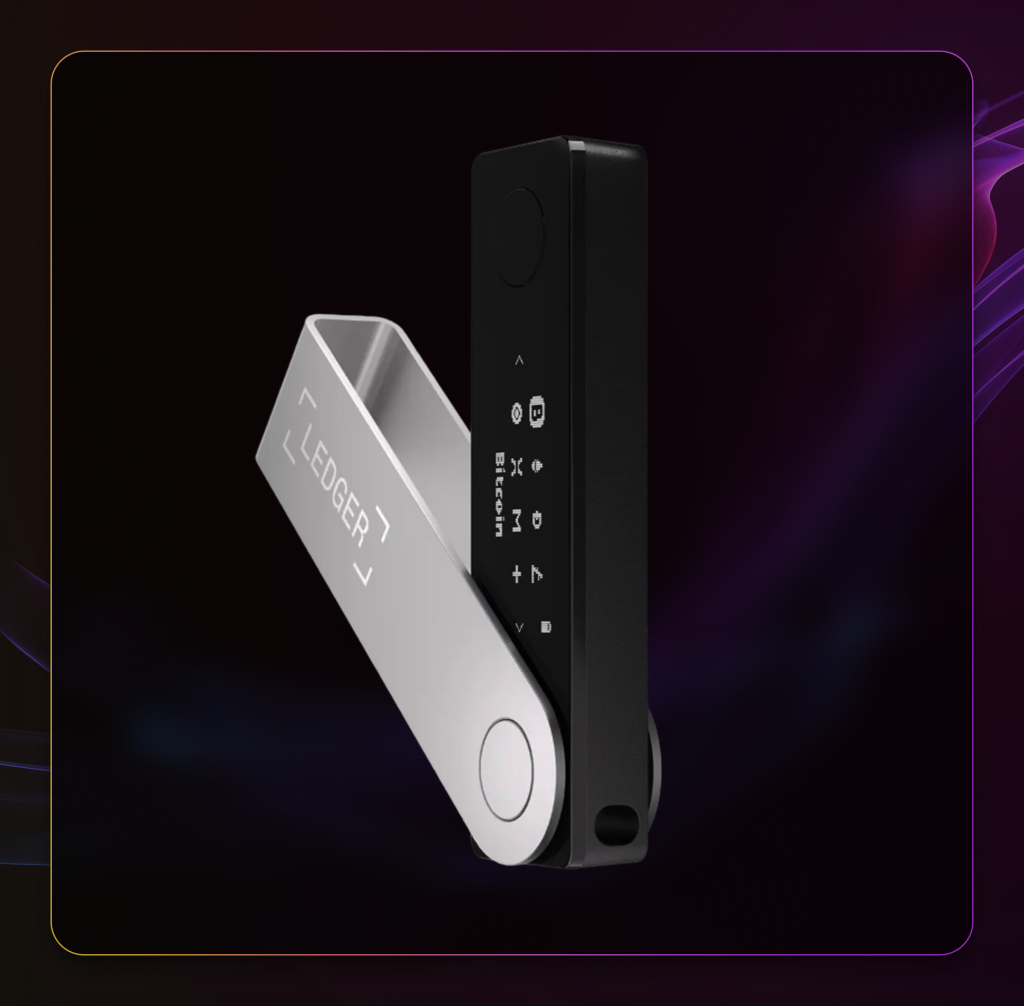
Ledger’s devices are known as cold wallets because they store private keys offline, reducing the risk of unauthorized online access. Cold wallets differ from hot wallets, such as Phantom Wallet, which are installed in your browser and regularly connected to the internet.
For you to manage your crypto inside the hardware wallet, you need two things:
1. Ledger Live: A computer application that enables you to access, manage, and monitor your crypto assets.
2. Ledger Wallet: The physical wallet you connect to your computer. Actions through Ledger Live will require confirmation from your physical wallet.
While hardware wallets like Ledger have grown in popularity, they do not offer a 100% safety guarantee. You’ll still need to secure your seed phrase and avoid signing malicious transactions. Taking a digital picture or storing your seed phrase online can lead to losses.
How Can I Start Staking With Ledger?
Staking with Ledger involves using a physical wallet and a software application. Ledger is a secure location for storing staked coins, while Ledger Live provides a streamlined interface for managing and monitoring staking activities.
Here’s how to start:
Set Up Your Ledger
The first step is to get your own Ledger. Visit the official Ledger Shop and order a physical wallet. As of April 2026, Ledger offers wallets priced from 41 to 332 euros.
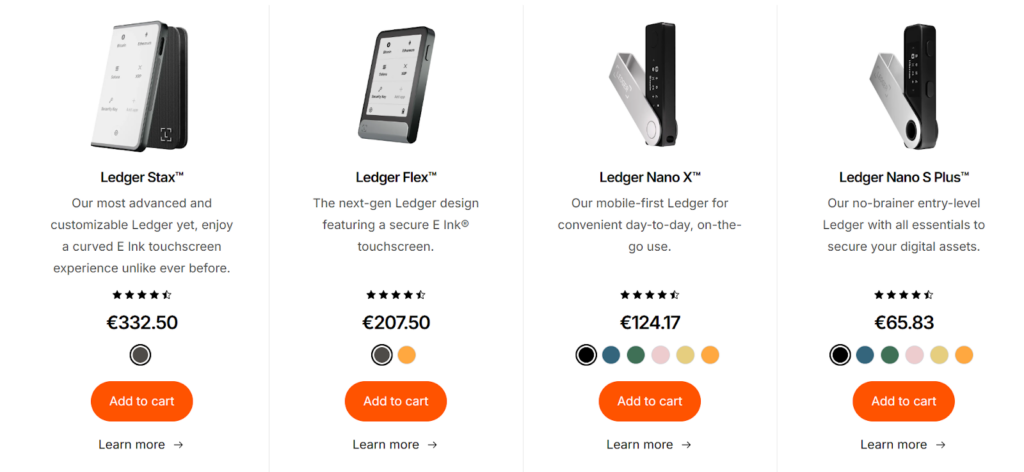
Once the Ledger arrives, connect it to your computer via the USB port. Remember to write down your seed phrase and store it in a secure location. You will also have to download Ledger Live.
Download the Blockchain Application
To deposit cryptocurrency such as Ethereum, Solana, or Cosmos, you must install a network application on your hardware wallet. Ethereum requires a separate installation from Solana and other blockchains.
If you purchase the starter hardware wallet, the device has limited storage, so install only the networks you need.
Fund Your Wallet
Transfer eligible cryptocurrency to your wallet. Ensure you have sufficient balance to cover the required staking minimums and transaction fees.
For safety reasons, you must confirm that the address displayed on the Ledger Live screen matches the one in your hardware wallet.
Once you have funded your account with crypto, it’s time to stake.
Navigate to the Staking Section
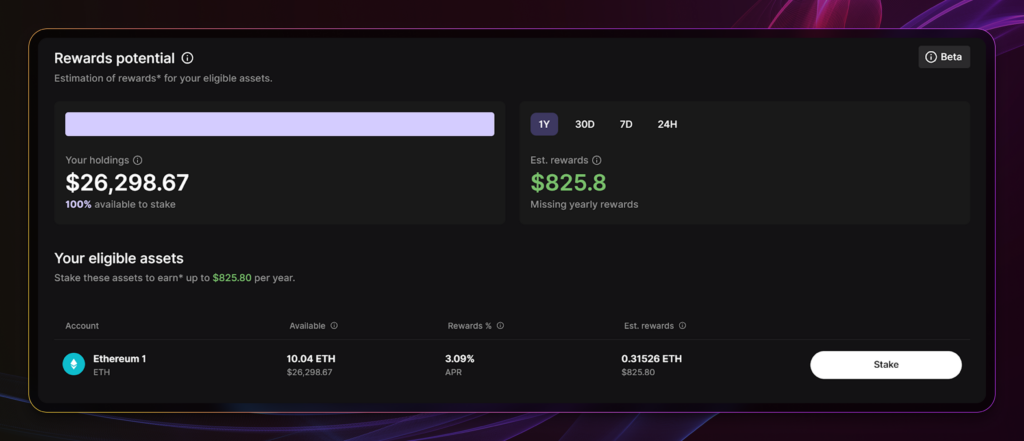
The Earn dashboard comes with a static staking calculator that estimates your potential yearly staking rewards. This calculation is helpful for quick comparisons, especially for those with multiple idle cryptocurrencies available.
Let’s say you’re eligible to stake ETH, the native token of Ethereum.
Click Stake beside your eligible asset to reveal the staking options.
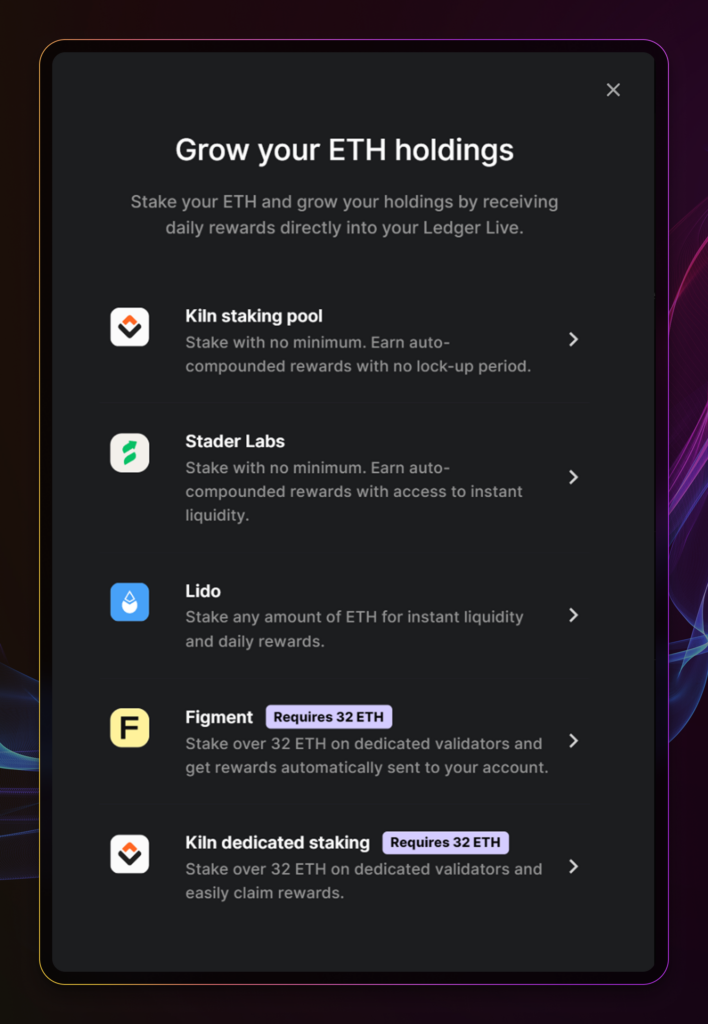
You can choose from staking pools (with no minimum required), liquid staking platforms like Lido, and Staking-as-a-Service providers such as Figment (32 ETH required). Read our Ethereum staking guides to compare the pros and cons of each option.
Once you’ve chosen the staking method, it’s time to start staking.
Start Staking
Let’s say you decided on Lido Finance. The staking interface on the Lido website is very similar.
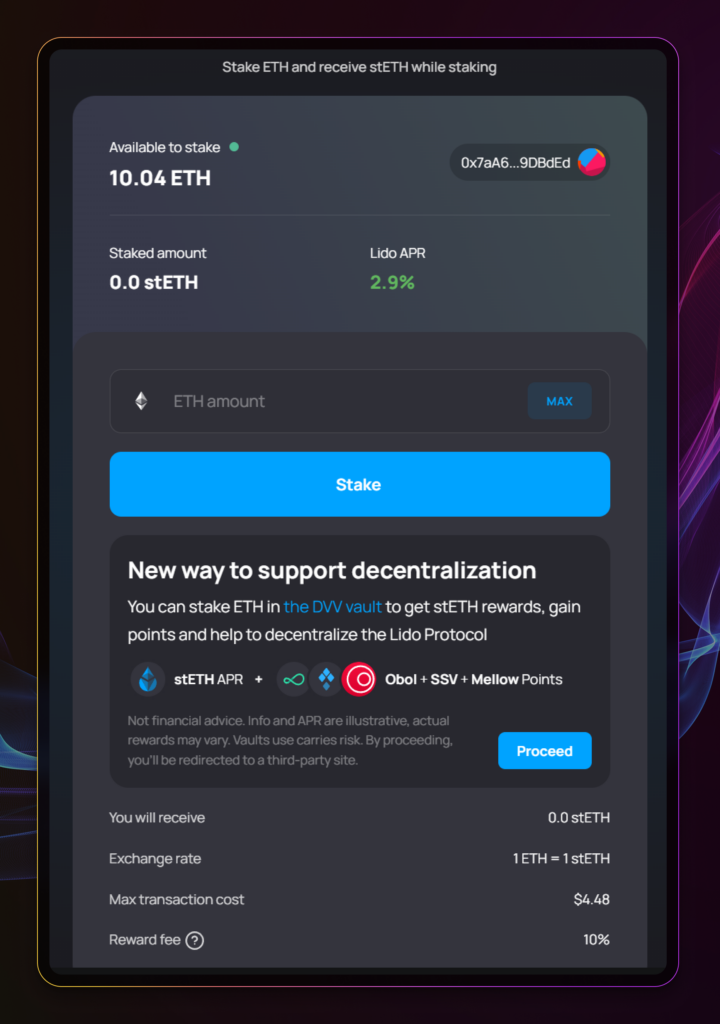
Enter the ETH you’d like to stake, review the details, and confirm the transaction with your hardware wallet.
After completing these steps, you will have staked your crypto and begin earning staking rewards. The Ledger Live app monitors your staking balance and accrued rewards.
What Crypto Can I Stake in the Ledger Device?
Ledger supports a handful of cryptocurrencies from Proof-of-Stake and Delegated-Proof-of-Stake networks. To check the list, click Earn on Ledger Live.
Support Cryptocurrencies for Earn and Staking
| Cryptocurrency | Annual Percentage Yield (APY) |
| Avalanche (AVAX) | 4.93% |
| Bitcoin (BTC) | 0.38% |
| Polkadot (DOT) | 11.43% |
| Solana (SOL) | 5.92% |
| Cosmos Hub (ATOM) | 19.92% |
Data as of April 2026.
As of April 2026, Ledger Live offers 22 cryptocurrencies for yield opportunities. Other tokens include Osmosis Cosmos ecosystem, as well as stablecoins like USDC.
How to Stake Cosmos with Ledger and Optimize Returns
You can also use Ledger to stake with apps outside Ledger Live. To do so, you first need to install the corresponding blockchain application on your Ledger device.
Let’s take staking with Polli.co as an example.
Polli is a staking optimization platform that caters to Cosmos and Lava Network. The platform offers above-market staking returns through its auto-compound of staking rewards and redelegation to validators.
Install Cosmos on Your Ledger Device
As with setting up your Ledger, you’ll need to download the corresponding blockchain application. In this case, set up Cosmos.
Install the network in your hardware wallet and follow the steps to either import a wallet or create a new account.
Install Keplr on Your Browser
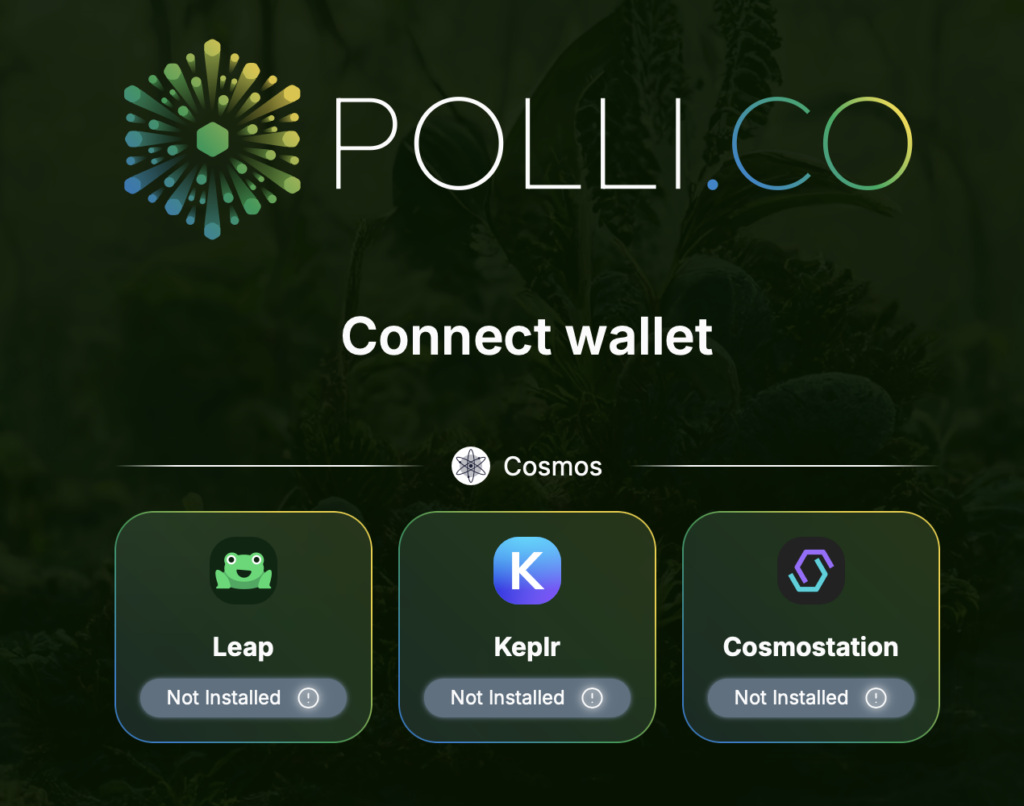
Polli supports three wallets: Leap, Keplr, and Cosmostation. Among these three, Keplr supports integration with Ledger.
Ledger recommends using Google Chrome for this process. Once you’ve installed Chrome, download the Keplr browser extension through this link.
Connect Your Ledger to Keplr
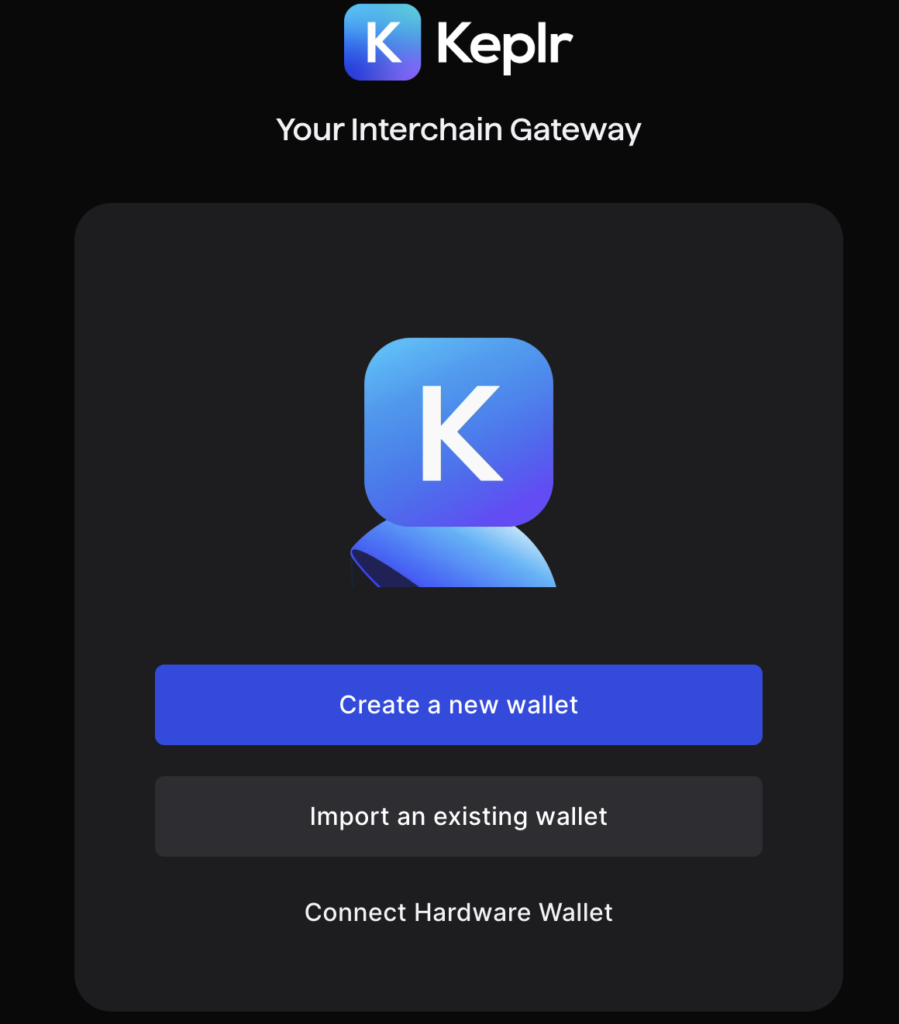
Once you’ve installed Keplr on your browser, connect your Ledger device to your computer. Then, open the Keplr browser extension.
Keplr should display an option to connect your hardware wallet. Note that if you use other browsers like Firefox, you won’t see the “Connect Hardware Wallet” option.
Follow the steps, and your Keplr wallet should display the Cosmos assets you see in Ledger Live.
Now you’re ready to stake with Polli and other decentralized applications.
APY Comparison: Ledger Staking vs Competitors
Ledger offers competitive staking rates compared to centralized exchanges and liquid staking protocols. Combined with its higher security, Ledger’s yield becomes attractive for retail stakers.
| Staking Platform | Annual Percentage Yield (APY) |
| Ledger | 3.10% |
| Binance | 2.71% |
| Coinbase | 1.85% |
| Lido (Liquid Staking) | 2.40% |
| StakeWise | 2.54% |
Data as of April 2026
Aside from native Ethereum staking, Ledger also offers integrations with the likes of Coinbase for pooled ETH staking as well as Kelp DAO for restaking.
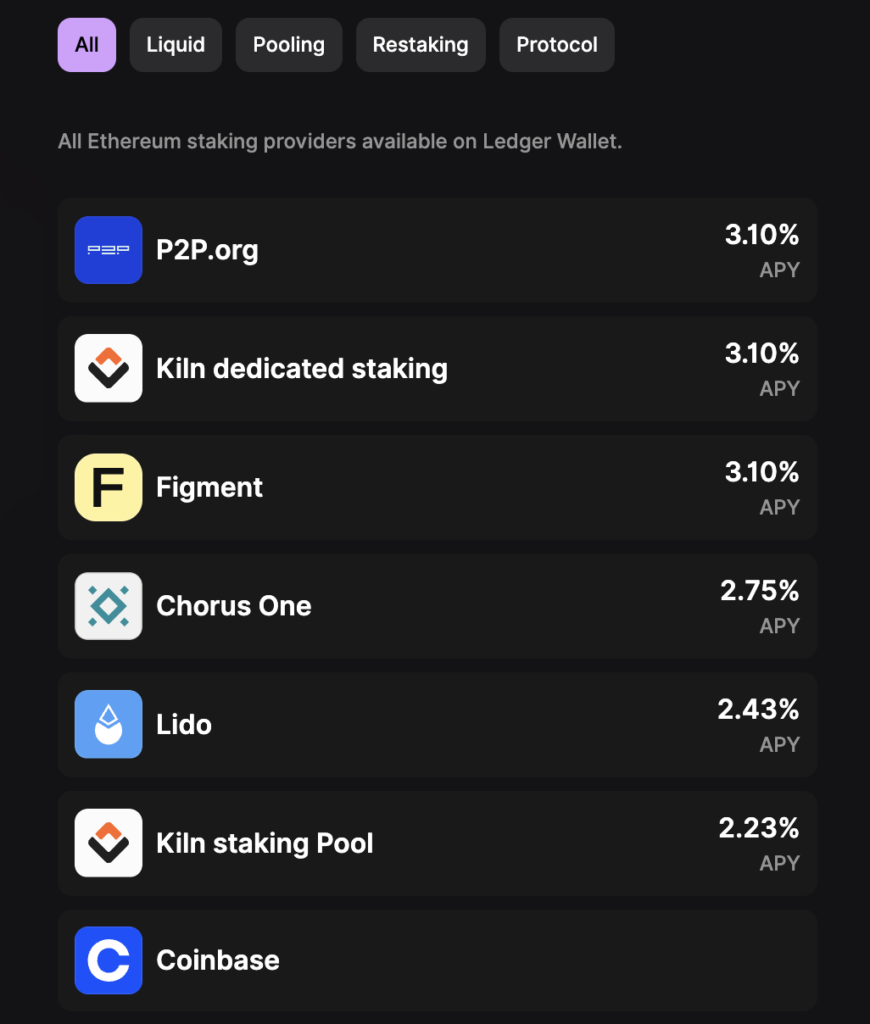
Ledger product screenshot as of April 2026.
Benefits of Hardware Device Staking Over Other Methods
Beyond the fancy dashboard and branded hardware wallet, Ledger provides a few key security benefits.
Enhanced Security
Ledger staking keeps funds in a highly secure offline environment. When staking, your assets are stored in “hot” wallets, which are more vulnerable to cyberattacks.
Let’s say someone has installed malware and remote hacking software on your computer. Since your browser wallet is password-protected, hackers could use a keylogger to capture the password and access it. Online wallets do not require any further security confirmation after logging in with the password.
In contrast, Ledger requires access and confirmation from the wallet. This extra layer of protection reduces the risks associated with online staking and gives users peace of mind that their funds are safe.
User Control
As the famous quote goes, “Not your keys. Not your crypto.”
Staking directly from a Ledger wallet means you retain complete control over your private keys and your crypto asset funds.
When staking on centralized exchanges, users must relinquish control of their keys, as exchanges typically hold them on users’ behalf. By keeping control of your keys, Ledger staking enables asset ownership and minimizes dependency on third parties.
Risks Associated with Ledger Staking
While Ledger offers a more secure way to interact with the blockchain, it is not immune to all security risks. Ensure that your seed phrase is safely stored offline and that you guard against malicious links.
Ledger staking also sacrifices the speed and flexibility offered by hot wallets.
Lack of Options
You’re limited to staking with the cryptocurrencies and providers in the Ledger Live application. If your desired network is not on Ledger’s list, you must wait for the company to add support for it.
You may also need more space in your wallet, which could prevent you from downloading the necessary staking applications.
Security Risks
According to Bloomberg, hackers stole approximately $500,000 in crypto from Ledger wallet users in December 2023 via a compromised Connect Kit.
A hacker targeted a former Ledger employee with a phishing attack and inserted malicious code into the company’s Connect Kit software, which interacts with decentralized applications (Dapps).
Ledger quickly spotted and deployed a fix.
While the attack did not compromise the hardware wallets, it shows that a cybersecurity company can still be a victim of a cyberattack.
DeFi Smart Contract Risks
While Ledger offers greater security with a hardware wallet, it does not guarantee the safety of the DeFi protocols linked within Ledger Live.
In April 2026, The Block reported that an attacker had exploited Kelp DAO, resulting in a $292 million loss. The attacker then deposited the stolen funds into Aave. Both Kelp DAO and Aave froze their platforms as a precaution.
Ledger integrates both Kelp DAO (for liquid restaking) and Aave (for earn) into its Ledger Wallet application. If you had deposited funds into these platforms, you could experience total loss of your assets.
FAQs About Ledger Staking
Interested in knowing more about Staking with Ledger? Here are some commonly asked questions:
What is Ledger Staking and how does it work?
Ledger staking means engaging in staking through your Ledger Live application and hardware wallet. Staking this way is more secure than staking with your browser wallet.
Whenever you stake with Ledger Live, you must connect your hardware wallet to your computer and confirm the transaction. This process adds more security layers as you need to have the Ledger hardware wallet and password on hand.
How to stake with a Ledger?
Once you’ve installed the necessary blockchain applications on your Ledger, staking comes easy. Open your Ledger Live application, select the Staking tab on the left. Choose your staking provider, and you’re all set.
What assets can you stake on a Ledger?
Ledger supports over a dozen crypto assets for staking. You can choose from major cryptos such as Ethereum and Solana, to smaller ones such as Injective (INJ) and Persistence (XRPT).
How long does it take to activate staking on Ledger?
Setting up your Ledger device takes thirty minutes to an hour. Once you’ve completed that, staking with Ledger happens in minutes.
Does staking with Ledger affect the security of my hardware wallet?
No. Staking via Ledger Live keeps private keys on the device at all times. The staking transaction is signed on the device, not the computer
Can I lose my crypto by staking with Ledger?
You can lose your crypto assets if the value of your tokens declines due to market volatility. In addition, the DeFi platform you deposit into via Ledger can be attacked, leading to total loss of your investment.
Can I stake Solana with Ledger?
Yes, Ledger Live supports SOL staking with approximately 5.4% APY by delegating to the Ledger by Figment validator.
Get Staking With Ledger
Ledger staking offers a highly secure way to earn rewards by staking crypto directly from your Ledger wallet. By staking with Ledger, investors benefit from the advanced security of an offline hardware wallet while retaining complete control over their assets.
Despite a few limitations, such as the available crypto assets and potential memory constraints, Ledger provides a streamlined staking experience that is valuable for users who prioritize security and autonomy.
Ledger delivers peace of mind for those with significant crypto holdings, making it a top choice among hardware wallets. Whether you’re a new or experienced investor, Ledger offers a way to expand your staking activities safely within a secure environment.
Editor’s Note: This article was originally published in October 2024 but has been updated with new information.
The content of solostakers.com is for informational purposes only and should not be considered financial advice. It represents the personal views and opinions of the author(s) and is not endorsed by any financial institution or regulatory body. Cryptocurrency and staking investments carry inherent risks and readers should conduct their own research and consult with a financial professional before making any investment decisions. The owner and author(s) of solostakers.com will not be liable for any losses, damages, or consequences arising from the use of the information on this site. By accessing solostakers.com, you agree to bear full responsibility for your investment decisions.

October 1, 2024
April 30, 2026


